
 Blog Theme 🗞️













Quick Buy Now Button for WooCommerce
Buy Now Button for WooCommerce empowers you to add a quick buy button and redirect users to cart, checkout or any external link for quick purchase.
Installation
Download the .zip file from your WooCommerce account.
Go to: WordPress Admin > Plugins > Add New and Upload Plugin the file you have downloaded.
Install Now and Activate.
Setup and Configuration
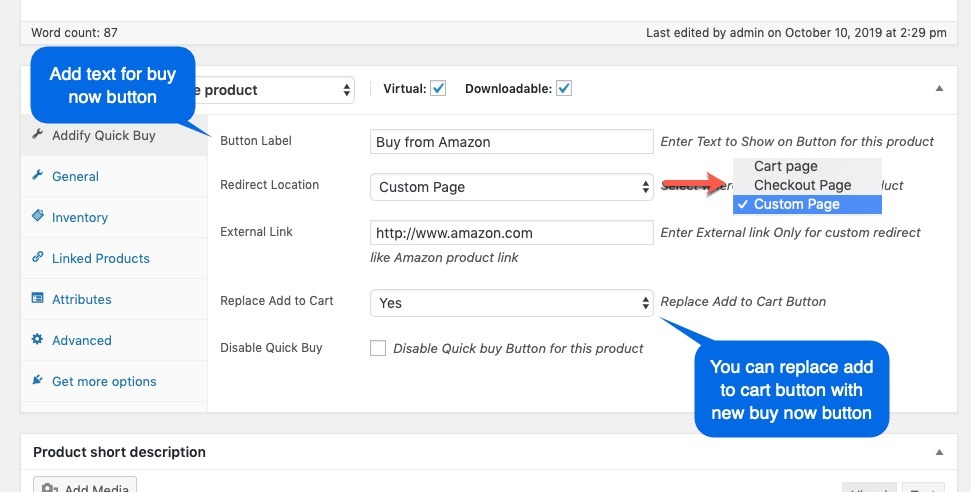
After activating Quick Buy Now Button, you can see the “Quick Buy” section under the WooCommerce menu as well as quick buy settings in the product edit page.
Product Level Settings:
The product level setting allows you to configure,
Buy now button text
Redirect location (Cart, Checkout or Any Custom Link)
Option to replace the “Add to Cart” button with the new buy button
 Overview
 𝐂𝐥𝐞𝐚𝐧 & 𝐒𝐄𝐎 𝐅𝐫𝐢𝐞𝐧𝐝𝐥𝐲 𝐂𝐨𝐝𝐞
 100% Responsive & Mobile Friendly
 𝐅𝐚𝐬𝐭 𝐋𝐨𝐚𝐝𝐢𝐧𝐠 𝐏𝐞𝐫𝐟𝐨𝐫𝐦𝐚𝐧𝐜𝐞
 Easy Installation & Setup
 𝐑𝐞𝐠𝐮𝐥𝐚𝐫 𝐔𝐩𝐝𝐚𝐭𝐞𝐬 & 𝐒𝐮𝐩𝐩𝐨𝐫𝐭
 Features
Related Products


Reviews
Clear filtersThere are no reviews yet.